in a single save
per location
everywhere
required
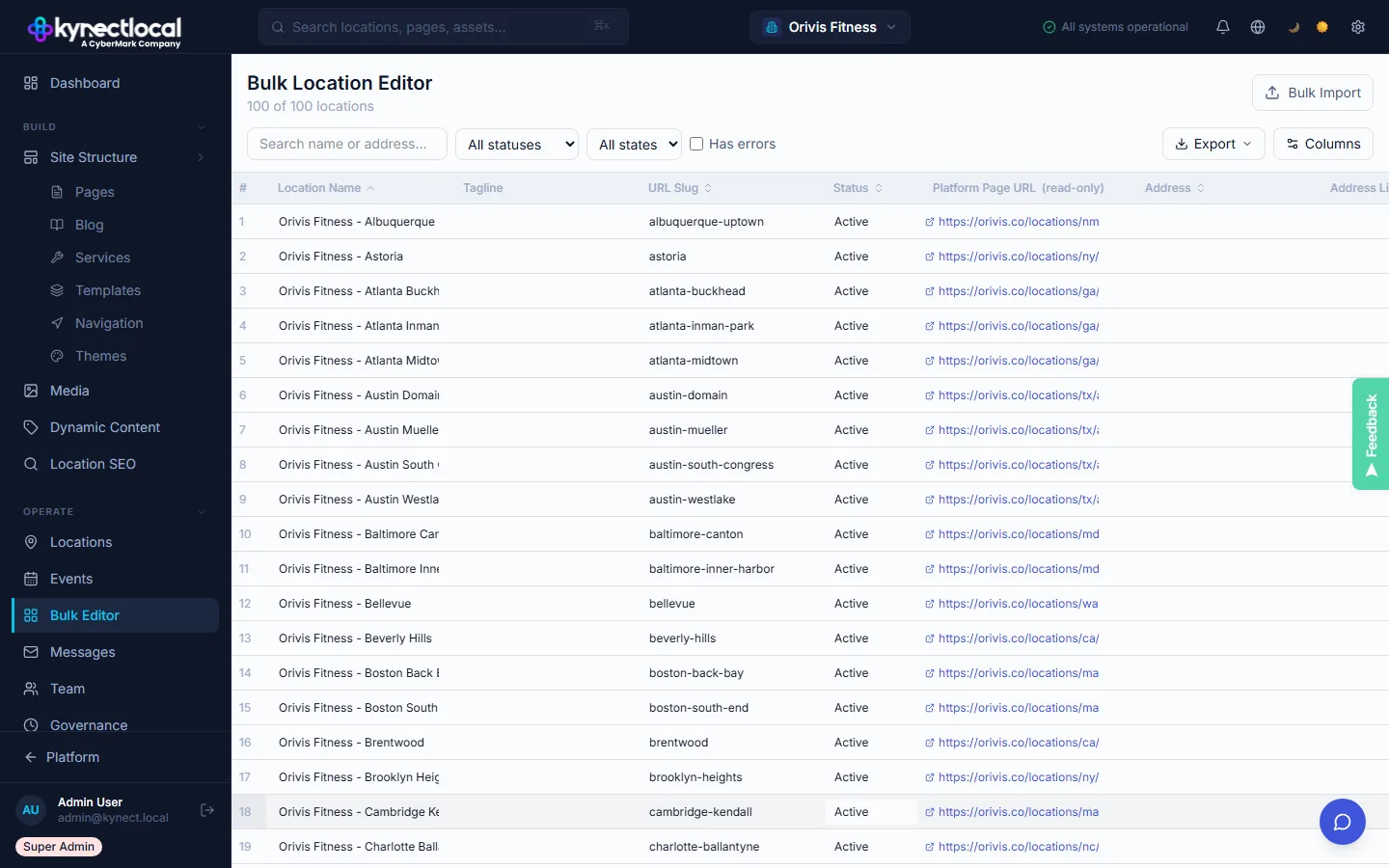
100 locations. One spreadsheet. Inline editing on every cell.
Open the bulk editor and every location shows up as a row. Click any cell to edit it directly: name, address, phone, hours, status, social links, active promotions. The column selector lets you hide everything you're not touching. Filter by state, tag, or status to focus on the right set of locations.
- →Inline editing on every cell
- →Column selector: show only the fields you need right now
- →Filter by status (Active / Onboarding / Coming Soon / Closed) and state
- →Save changes per row or bulk-save all
Migrate 100 locations in a CSV. Not a month of manual entry.
Got your location data in a spreadsheet already? Upload it. The import wizard walks you through mapping your columns to KynectLocal fields. You see a full summary before anything saves. Existing locations update in place. New rows get created as new locations. Export the full dataset whenever you need it for reporting, audits, or sharing with your agency.
- →CSV upload with a guided column mapping step
- →Preview the import before anything saves
- →Updates existing locations or creates new ones
- →Export the full dataset as CSV any time
Filter by state, tag, or status. Update what matters.
The Bulk Editor's filter bar lets you narrow to any subset of locations before editing: by state, franchise group, location tag, or status. Column visibility is fully configurable per session. Show only the fields you're updating right now. Hide the rest.
- →Filter by state, franchise group, tag, or status
- →Column visibility toggle per session
- →Sticky header stays visible while scrolling hundreds of rows
- →Changes highlighted before you confirm
What the bulk editor does
Managing a network of locations shouldn't mean opening 200 tabs or filing a support request. The bulk editor puts your whole network in one view.
Edit all locations simultaneously
Every location is a row. Every data field is a column. Click a cell, type your change, save. It goes out to every channel automatically. No exports, no workarounds, no IT request.
Bulk import via CSV
Moving from another platform or starting fresh? Drop in a CSV and map your columns in a few clicks. No reformatting, no manual re-entry, no back-and-forth with your data team.
Export for reporting or audits
Export your full location dataset whenever you need it: quarterly reports, compliance audits, franchise disclosure documents, or sharing with your agency. Everything comes out clean in CSV.
Column selector
With 40+ fields per location, the column selector lets you show only what matters for the task at hand. Updating hours for a holiday campaign? Show hours only. Auditing addresses? Show addresses only.
Three steps to network-wide updates
Open the Bulk Editor
All locations appear as rows in the spreadsheet view. Use the column selector to surface only the fields you need for this task. Filter by state, status, or franchise group to narrow your working set.
Edit inline or import via CSV
Click any cell and type your change directly. Or drop in a CSV with your updates. The importer maps columns to the right fields and flags anything that needs review before it saves. Brand governance rules apply here too.
Save and publish everywhere
Hit save and the update goes out everywhere at once: location pages, Google schema, listing partners, AI crawlers, and your llms.txt file. One action. Every channel. Done.
Network-wide changes in minutes, not days.
- → Push a new service description to 500 locations in one save. No email chains, no shared spreadsheets, no version conflicts.
- → Update holiday hours across every location before the AI index picks up stale data.
- → Governance rules apply to bulk imports too. Locked fields stay locked, even if someone tries to override them in a CSV.
Your data, always current.
- → If you manage multiple locations, the bulk editor gives you one view of all of them. No jumping between profiles.
- → Export your location data at any time for your own records or to share with a local marketing partner.
- → Edits within your allowed fields go live right away. No waiting for brand admin to process each request individually.
Related features
Location Profiles
The master record for every location. 40+ structured fields that feed every downstream channel from one source of truth.
Explore →Governance & Approvals
Field-level lock states and approval workflows ensure that bulk changes never override what brand admins have protected.
Explore →Integrations
Connect KynectLocal to your existing data stack. Sync location data with Google Business Profile, listing partners, and more.
Explore →See what KynectLocal costs for your network.
Per-location pricing with no seat limits. Build a custom estimate in about two minutes.